
 By admin
5 Essential Principles for Effective Website Design
Introduction
In the digital age, your website often represents the first impression a potential customer has of your brand. Whether you run a business, blog, professional portfolio, or online store, your website should be designed with intention, clarity, and purpose. As online competition continues to grow, users have become more selective, expecting websites to be fast, visually appealing, simple to navigate, and rich in valuable information. A poorly designed website can lead to lost customers, reduced credibility, and lower search engine rankings, while a well-designed one enhances engagement, trust, functionality, and conversion.
Effective web design is not solely about aesthetics. It is a combination of visual design, usability, user psychology, content strategy, accessibility, and performance optimization. This article outlines five essential rules in website design that help ensure your website serves its intended purpose effectively—whether that purpose is educating, selling, informing, or engaging visitors. These rules are based on modern UX (user experience) principles and current digital trends.
Main Content
1. Deliver Value Immediately — Avoid Splash Pages
Splash pages, once popular in the early days of the internet, commonly displayed a large branded image, logo, or animated introduction that users had to click through in order to access the main site. While they may look visually appealing, splash screens typically offer no practical value. Modern web users navigate quickly and prefer immediate access to information.
Why Splash Pages Are Ineffective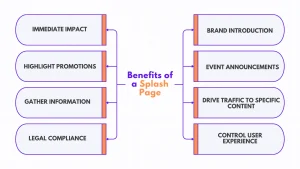
- They Slow Down Access: Visitors want information instantly. A splash page adds friction and delay.
- They Offer No Information: They do not highlight your services, products, or navigation options.
- They Risk User Drop-Off: Even a one-second delay can significantly reduce visitor retention rates.
What to Do Instead
- Display your primary message, call-to-action, or product value on the homepage.
- Use a clear headline, a concise description, and easy-to-find links or buttons to guide users.
- Ensure that the first screen (above the fold) communicates what your website is about without scrolling.
Providing immediate value encourages engagement and reduces bounce rates, showing visitors that your website respects their time.
2. Reduce Distractions — Avoid Excessive Banner Advertisements
Banner ads can be useful for monetization, but when overused, they create clutter and damage user trust. Modern users have developed what is known as “banner blindness,” meaning they automatically ignore anything that resembles an advertisement.
The Downsides of Too Many Ads
- Reduced Credibility: Visitors may feel overwhelmed or believe the site is low-quality or spam-like.
- Lower Engagement: Ads draw attention away from meaningful content and calls-to-action.
- Slow Page Load Times: Large ad scripts and images reduce performance and harm SEO rankings.
A Better Strategy
Instead of relying on banner ads:
- Provide high-value, relevant content that meets your users’ needs.
- Integrate affiliate recommendations naturally into context, reviews, tutorials, or product pages.
- Use thoughtful placements such as discrete call-to-action buttons within articles.
When visitors feel informed instead of “sold to,” they are more likely to trust your recommendations and convert.
3. Keep Navigation Simple and Intuitive
Navigation is one of the most important aspects of user experience. If visitors cannot find what they need quickly, they will leave the website and likely never return. An effective navigation structure should feel natural and effortless.
Key Characteristics of Good Navigation
- Simplicity: Users should understand how to navigate within seconds.
- Clarity: Menu items should be descriptive and free of confusing jargon.
- Consistency: Navigation should look and function the same across all pages.
Navigation Mistakes to Avoid
- Multi-layered dropdowns that overwhelm or confuse users.
- Animated or flashy navigation menus that distract from primary content.
- Hidden menus that require multiple clicks to locate essential pages.
Tips for Effective Navigation Design
- Place the main menu at the top of the page or in a clearly visible sidebar.
- Include a search bar, especially for content-heavy websites.
- Display a footer menu with secondary or frequently used links.
A well-designed navigation system ensures that users stay longer and engage more deeply with the website.
4. Make It Clear Where the User Is — Provide Visual Orientation
As users explore your website, they need to know where they are and how to return to previously viewed pages. This orientation is essential for a positive browsing experience and reducing confusion.
Elements That Help Users Stay Oriented
- Breadcrumbs: These show the user’s path through the site (e.g., Home > Blog > Article Title).
- Consistent Header and Menu Layout: Navigation appears the same across pages.
- Clear Page Titles and Headings: Each page should communicate its purpose instantly.
When users know where they are, they can browse confidently and explore more content. Confusion leads to frustration—and frustration leads to visitors leaving your site.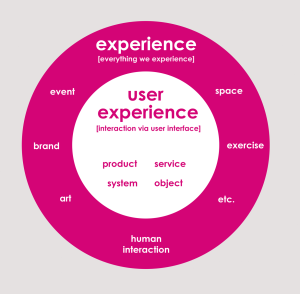
5. Avoid Automatically-Playing Audio — Respect the User’s Experience
Audio can enhance a website when used thoughtfully—for video content, tutorials, or presentations. However, automatically playing audio, especially in a continuous loop, can irritate users and drive them away.
Why Auto-Play Audio Is a Problem
- Many users browse in quiet public spaces, at work, or late at night.
- Sudden sound disrupts concentration and feels intrusive.
- Users may not know how to stop the audio, leading them to close the page entirely.
Best Practices for Audio Use
- Never play audio automatically—allow users to choose when to begin playback.
- Always include visible controls such as play, pause, and volume adjustment.
- Ensure accessibility by including transcripts or captions for spoken audio.
By respecting user choice and environment, your website becomes more user-friendly and professional.
Conclusion
The most effective websites are built with clarity, usability, purpose, and the user’s experience in mind. By avoiding unnecessary splash pages, minimizing intrusive ads, simplifying navigation, providing location awareness, and avoiding automatic audio, you create a website that feels professional, engaging, and trustworthy. Good design is not simply about visual flair—it is about communication, accessibility, functionality, and user satisfaction.
As technology evolves, user expectations continue to rise. Websites must be fast, responsive, well-organized, and content-rich. By applying these five essential rules, you enhance not only your site’s appearance but also its performance, credibility, and long-term success.
How Traffic Exchange Systems Work