
 By admin

Why You Shouldn’t Attempt Data Recovery Yourself: A Comprehensive Guide
In today’s digital age, data is one of the most valuable assets for individuals and businesses alike. From personal memories stored as photos to critical business documents, the loss of data can be catastrophic. Data recovery is a specialized process designed to retrieve lost or inaccessible data from storage devices. However, attempting to recover data without professional expertise can lead to permanent loss. This article explores why you should leave data recovery to trained professionals and highlights the potential risks of DIY approaches.
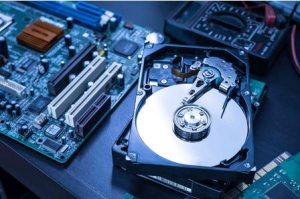
The Complexity of Data Recovery
Data recovery is not a simple task. It involves a deep understanding of storage device architecture, file systems, and specialized tools. Hard drives, solid-state drives (SSDs), and other storage media are designed with intricate components and mechanisms that require precise handling. Here are some reasons why data recovery is so complex:
- Delicate Internal Components: Storage devices like hard drives contain sensitive components, including platters, actuator arms, and spindles. These components operate at high speeds and are extremely fragile. Mishandling them can result in irreversible damage.
- Specialized Environments: Professional data recovery often takes place in cleanroom environments to prevent contamination from dust and debris. Even a single speck of dust can cause significant damage to a hard drive platter.
- Proprietary Tools and Techniques: Experts use advanced tools and proprietary software to access and retrieve data. These tools are not typically available to the general public and require extensive training to operate effectively.
Common Mistakes in DIY Data Recovery
Many individuals attempt to recover data themselves, either to save money or out of curiosity. Unfortunately, DIY data recovery can exacerbate the problem. Here are some common mistakes:

1. Using Disk Repair Utilities Incorrectly
Disk repair utilities are often marketed as quick fixes for data loss. However, these programs can write to the disk during the repair process, potentially overwriting the very data you are trying to recover. This is especially risky if the drive has physical damage or is failing mechanically.
2. Opening the Hard Drive
Opening a hard drive without proper equipment and expertise is one of the most damaging actions you can take. The internal components are highly sensitive:
- Platters: These are coated with a magnetized material and are critical for storing data. Fingerprints, scratches, or dust can permanently damage the platters.
- Actuator Arm: This component reads and writes data to the platters. Any misalignment can render the drive inoperable.
3. Physical Impact
Some myths suggest that tapping or dropping a hard drive can fix hardware issues. In reality, any physical impact can worsen the situation by damaging internal components beyond repair.

Why Professional Data Recovery Is Essential
Professional data recovery services are equipped to handle a wide range of data loss scenarios, from accidental deletions to severe physical damage. Here’s why you should trust the experts:
1. Accurate Diagnosis
Data recovery specialists perform thorough diagnostics to identify the root cause of data loss. They determine whether the issue is related to logical errors, mechanical failures, or both. This ensures that the recovery process is tailored to the specific problem.
2. Advanced Tools and Techniques
Professionals use state-of-the-art tools and techniques, including:

- Cleanroom Facilities: To safely open and repair drives without contamination.
- Proprietary Software: To recover data from corrupted or inaccessible file systems.
- Specialized Hardware: To repair damaged components and extract data directly from storage chips.
3. Maximizing Data Recovery Success
Experts have the knowledge and experience to handle even the most challenging cases. By leaving your device in their hands, you increase the chances of recovering your data intact.
The Risks of DIY Data Recovery
Attempting data recovery on your own can lead to several risks, including:
1. Permanent Data Loss
Many DIY methods can overwrite or damage data, making it impossible to recover even with professional help.
2. Voiding Warranties
Opening a storage device or using unauthorized tools may void the manufacturer’s warranty, leaving you without options for replacement or repair.
3. Increased Costs
If a DIY attempt fails, professional recovery may become more expensive or less likely to succeed due to additional damage caused during the attempt.
When to Contact a Professional
It’s essential to recognize the signs of a failing storage device and act quickly to avoid further damage. Here are some scenarios where you should contact a professional immediately:
- Unusual Noises: Clicking, grinding, or beeping sounds indicate mechanical issues.
- Error Messages: Alerts such as “Drive Not Found” or “File System Corrupted” signal logical problems.
- Physical Damage: Water exposure, fire damage, or dropped devices require specialized handling.
- Inaccessible Data: Files that are missing, corrupted, or cannot be opened often indicate underlying issues.
Choosing the Right Data Recovery Service
Not all data recovery services are created equal. Here are some tips for selecting a reputable provider:
- Experience and Expertise: Look for companies with a proven track record in data recovery.
- Cleanroom Certification: Ensure they operate certified cleanroom facilities for safe handling of storage devices.
- Transparent Pricing: Avoid providers with hidden fees or unrealistic guarantees.
- Customer Reviews: Check reviews and testimonials to gauge the quality of their service.
Conclusion
Data recovery is a highly specialized field that requires expertise, precision, and the right tools. While it may be tempting to attempt recovery yourself, the risks far outweigh the potential benefits. By trusting professionals, you can safeguard your valuable data and minimize the chances of permanent loss. Remember, when it comes to data recovery, it’s always better to err on the side of caution and seek expert help.
Ethics and Privacy in Computer Security