
 By admin
How to Create a Sitemap: A Modern, Complete Guide for Website Owners
Introduction
In today’s digital landscape, user experience and search visibility determine whether a website succeeds or gets lost in the endless competition online. One of the simplest yet most impactful tools supporting both user navigation and SEO performance is the sitemap. Much like a traditional table of contents in a book, a sitemap provides a clear, well-organized map of your entire website structure. It serves two important audiences at the same time: human visitors looking for fast navigation, and search engine crawlers that must understand your site’s architecture to index it effectively.
Creating a sitemap is no longer the technical challenge it once was. Modern website owners—whether they are business professionals, bloggers, developers, or e-commerce sellers—now have access to advanced tools, automated generators, and updated standards from search engines such as Google and Bing. Still, understanding how sitemaps work and how to create one manually remains important for ensuring accuracy, personalization, and maximum control over your site’s organization.
This comprehensive guide explains how to create a sitemap, why it matters, how to optimize it for today’s SEO environment, and what best practices modern website owners should follow. Whether you choose a manual approach or prefer to automate the process, this article will equip you with everything you need to build a professional and effective sitemap.
Main Article
1. Understanding the Purpose of a Sitemap
1.1 What Is a Sitemap?
A sitemap is a structured list of all the important pages, sections, and links on your website. It acts as a roadmap that helps:
- Visitors quickly locate the information they need
- Search engine bots efficiently crawl your website
- SEO algorithms understand the hierarchy and relevance of your content
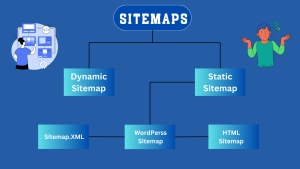
There are two primary types of sitemaps:
- HTML sitemaps — Designed for human visitors
- XML sitemaps — Designed specifically for search engines
Today, XML sitemaps are more widely used for SEO, but HTML sitemaps are still valuable for enhancing site navigation and user experience.
1.2 Why Sitemaps Matter for SEO
Modern search engines rely heavily on XML sitemaps to understand how your site is organized. A properly generated sitemap can:
- Improve crawlability
- Help new pages get indexed faster
- Highlight important pages and content
- Reduce indexing issues caused by internal linking mistakes
- Support sites with large or complex structures
- Enhance overall search visibility and ranking performance
In other words, a sitemap acts as a direct communication channel between your website and search engines, ensuring nothing important is overlooked.
2. Preparing to Create Your Sitemap
2.1 Audit Your Website Content
Before writing or generating your sitemap, make sure you know exactly what belongs in it. Perform a detailed audit of your site, including:
- Main pages
- Subpages
- Blog posts
- Product pages
- Landing pages
- Category and tag pages
- Media files (optional)
- Important internal resources
This step ensures your sitemap is complete and error-free.
2.2 Identify Priority Pages
Some pages matter more than others. Search engines allow you to assign priority levels within XML sitemaps. A few examples of high-priority pages include:
- Homepage
- Product or service pages
- High-traffic blog posts
- Category hubs
- Contact page
- About page
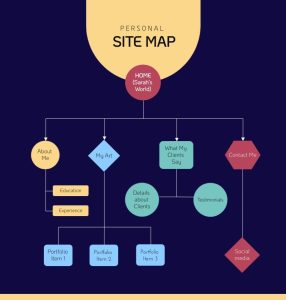
Understanding your page hierarchy helps you design a sitemap that supports your business goals.
2.3 Decide: Manual or Automatic Creation?
You can create a sitemap in two ways:
- Manual creation — Ideal for developers or owners who want full customization.
- Automatic generation — Faster, easier, and highly accurate for most modern websites.
Depending on your skills and the number of pages your site has, either option can be effective.
3. How to Create a Sitemap Manually
Creating a sitemap manually gives you complete control over structure, formatting, and link accuracy. The process is similar to creating a new webpage.
3.1 Step One: Prepare Your List of Pages
Use a simple program like Notepad or any text editor. List all your pages and URLs. It should feel like outlining a book’s table of contents:
- Start with the main sections
- Add subpages underneath
- Ensure no important page is missing
A rough draft helps guarantee that your sitemap is complete.
3.2 Step Two: Create a New Sitemap Page
You have two options:
- Insert the sitemap into an existing webpage
- Create a dedicated sitemap page
If you are making an HTML sitemap for users, you can structure it like a simple web page with basic tags, lists, and links. For example:
<ul>
  <li><a href="https://www.example.com/">Home</a></li>
  <li><a href="https://www.example.com/about">About Us</a></li>
  <li><a href="https://www.example.com/services">Services</a></li>
</ul>
If you’re creating an XML sitemap, it should follow specific formatting rules that search engines recognize.
3.3 Step Three: Add Sitemap Links
To make your sitemap easily accessible, add a link to it from:
- Your website’s footer
- The main menu
- The homepage
This ensures users and search bots can find it without difficulty.
3.4 Step Four: Test All Links
Before uploading your sitemap, check every link manually:
- Ensure no links are broken
- Confirm your URLs follow a consistent format
- Test redirects
- Check for 404 errors
Quality control is essential because search engines dislike sitemaps with invalid or outdated links.
3.5 Step Five: Upload the Sitemap to Your Server
Once your sitemap is complete:
- Upload your HTML sitemap like any other web page
- Upload your XML sitemap to your site’s root directory (e.g., https://example.com/sitemap.xml)
- Confirm it loads correctly in your browser
This step ensures your sitemap is publicly accessible for both users and search engines.
4. Creating a Sitemap Automatically
Modern website technology has made sitemap creation incredibly simple. Today, most platforms generate sitemaps automatically.
4.1 Automated Sitemap Generators
There are hundreds of online tools that can build a sitemap instantly. Most require only your website URL.
Well-known generators include:
- XML-Sitemaps.com
- Yoast SEO (WordPress)
- Rank Math
- Screaming Frog SEO Spider
- Google Search Console tools
These tools scan your entire website and output a fully formatted XML sitemap.
4.2 CMS Platforms with Built-in Sitemaps
Popular content management systems include automatic sitemap creation:
- WordPress: generates
sitemap.xmlautomatically or through SEO plugins - Shopify: automatically creates
sitemap.xmlfor stores - Wix / Squarespace: provide built-in sitemap files
- Magento: includes sitemap functionality
These platforms ensure your sitemap updates automatically whenever you add, edit, or remove pages.
4.3 Pros and Cons of Automatic Sitemaps
Benefits:
- Fast and effortless
- Accurate formatting
- Automatically updates
- No programming knowledge required
Drawbacks:
- Less customization
- May include pages you prefer to exclude
- Generic structure shared by many websites
If you require full control over your sitemap and want a uniquely organized structure, manual creation remains the best approach.
5. Optimizing Your Sitemap for Modern SEO
5.1 Assign Page Priorities
Most XML sitemaps allow priority values from 0.0 to 1.0. Use them to highlight important content.
5.2 Use “Last Modified” Tags
Including the <lastmod> tag helps search engines know when content was updated, improving crawl efficiency.
5.3 Avoid Duplicate URLs
Removing duplicate or near-duplicate pages improves:
- Crawl budget
- Ranking clarity
- Content value
5.4 Exclude Low-Value Pages
Not every URL must appear in your sitemap. Exclude:
- Admin pages
- Login pages
- Filtered search pages
- Internal system folders
- Unimportant or temporary content
5.5 Keep Files Under 50,000 URLs
Google requires XML sitemaps to contain:
- No more than 50,000 URLs per file, or
- A file size under 50MB
Large websites should create a sitemap index.
6. Submitting Your Sitemap to Search Engines
Once your sitemap is uploaded, make sure search engines know where to find it.
6.1 Submit to Google Search Console
- Log in to Google Search Console
- Navigate to “Sitemaps”
- Enter your sitemap URL
- Click “Submit”
Google will begin crawling the sitemap immediately.
6.2 Submit to Bing Webmaster Tools
Bing’s submission process is similar and ensures your site appears on Bing and Yahoo search results.
6.3 Add Sitemap Location to Your Robots.txt File
Include this line:
Sitemap: https://www.example.com/sitemap.xml
Search engines automatically scan this file and locate your sitemap.
7. Manual vs. Automatic Sitemaps: Which Is Better?
7.1 When to Choose Manual Creation
Manual sitemaps are better for:
- Custom websites without CMS platforms
- Developers who want full control
- Websites with unique structures
- Owners who want personalized organization
7.2 When to Choose Automatic Creation
Automatic sitemaps are ideal for:
- WordPress, Shopify, Wix users
- Large websites that update frequently
- Beginners with no coding experience
- Fast and simple SEO management
7.3 Using Both Approaches Together
Many professional websites use both:
- An automatically updated XML sitemap for search engines
- A manually crafted HTML sitemap for users
This combination gives you the benefits of both accuracy and customization.
8. The Importance of a Sitemap for Website Success
A sitemap is more than a technical feature—it is a critical digital asset. With millions of searches taking place every day, having a clear, accurate roadmap ensures your website can be found by the right people. If your content matches what a user is searching for, your sitemap guides search engines to index your pages correctly and helps visitors find what they need instantly.
Whether automatically generated or built manually, a sitemap serves the same essential purpose: to make your website more visible, more navigable, and more effective.
Conclusion
Creating a sitemap is one of the most important steps in building a fully optimized website. It enhances user navigation, supports powerful SEO performance, ensures faster indexing, and provides search engines with a complete picture of your site structure. Today, sitemap creation is easier than ever—with manual methods offering full customization and automated systems providing speed and simplicity.
Regardless of the method you choose, what matters most is that your sitemap is accurate, easy to navigate, updated regularly, and properly submitted to search engines. By investing a small amount of effort into building and maintaining your sitemap, you significantly improve your chances of reaching new customers, increasing organic traffic, and strengthening your online presence.
A well-made sitemap is not just a technical file—it is a strategic advantage. Make sure your website has one.